Meta Description:
Learn everything about passport size photo requirements, correct dimensions, background, online editing, printing tips, and how to create a professional passport size picture.
Passport Size Photo: Complete Guide to Create the Perfect Picture
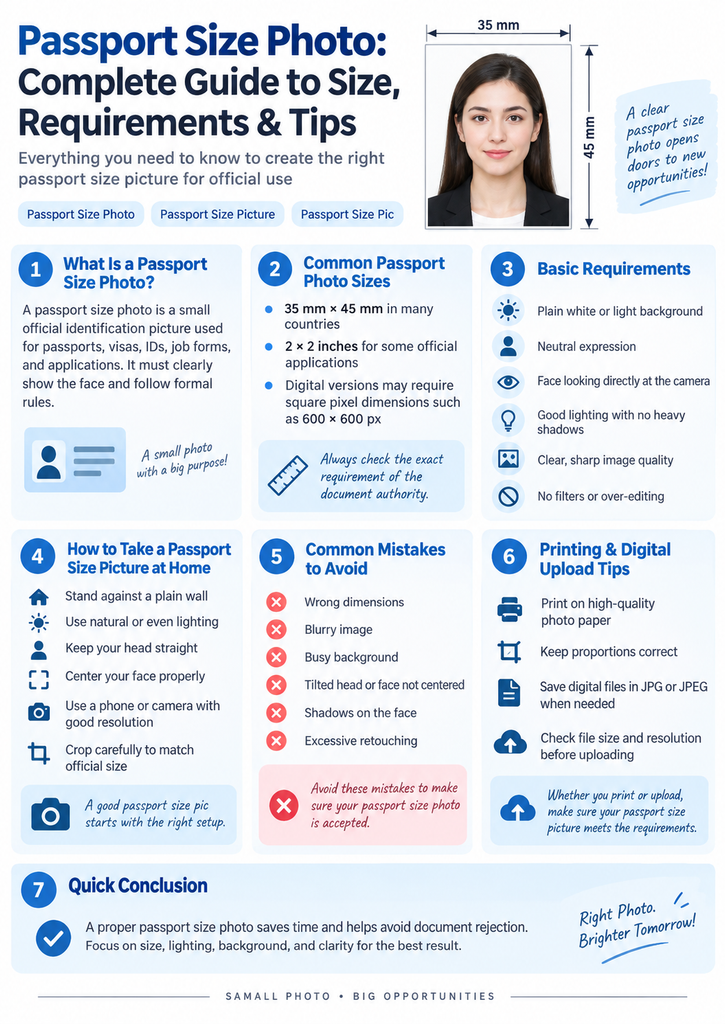
A passport size photo is an important requirement for many official documents, including passports, visas, identity cards, job applications, educational forms, and various government documents. A properly prepared photo helps avoid rejection and ensures that your application process continues smoothly.
Many people search for terms like passport size photo, passport size picture, and passport size pic when they need a professional-looking image that meets official standards. Although taking a photo may seem simple, there are several important factors such as image size, background, lighting, facial expression, and printing quality that need attention.
In this complete guide, we will explain everything you need to know about creating a perfect passport size photo.
What Is a Passport Size Photo?
A passport size photo is a small identification photograph used for official purposes. It usually shows a person’s face clearly with a simple background and proper alignment.
Unlike normal personal photographs, passport photos must follow specific rules. The face should be visible, the image should be clear, and the person should maintain a natural expression.
Different countries and organizations may have different requirements. For example, some applications require specific dimensions, while others focus on background color and face positioning.
Standard Passport Size Photo Dimensions
The size requirement for a passport photo depends on the country and document type.
Common passport photo sizes include:
- 35mm × 45mm
- 2 × 2 inches
- 600 × 600 pixels for some digital applications
Before printing your passport size picture, always check the official requirements of the organization where you will submit it.
For digital applications, image quality and file size can also matter. A high-resolution image helps maintain clarity when uploaded online.
Requirements for a Perfect Passport Size Picture
Creating a professional passport size pic requires following some basic rules.
1. Proper Background
The background is one of the most important parts of a passport photo.
A good passport photo usually requires:
- Plain white or light-colored background
- No objects behind the person
- No shadows
- Clean and professional appearance
A simple background helps facial features remain clear and makes the photo suitable for official verification.
2. Correct Face Position
Your face should be positioned correctly in the image.
Important points include:
- Look directly at the camera
- Keep your head straight
- Keep both eyes open
- Avoid extreme expressions
- Keep your face fully visible
A natural expression is usually preferred because it provides accurate identification.
3. Proper Lighting
Lighting can greatly affect the quality of your passport size photo.
Poor lighting can create:
- Dark shadows
- Uneven skin tone
- Blurry details
For the best result:
- Use soft natural light
- Avoid strong shadows
- Make sure your face is evenly illuminated
Professional photographers use controlled lighting to create clear identification photos.
How to Take a Passport Size Photo at Home
Today, many people create passport photos at home using smartphones.
Follow these steps:
Step 1: Choose a Good Location
Find a place with:
- Plain wall background
- Good natural light
- Enough space for proper framing
Step 2: Use a Good Camera
Modern smartphones can capture high-quality images. Keep the camera stable and avoid using filters that change your appearance.
Step 3: Maintain Proper Position
Stand or sit straight and look directly at the camera.
Make sure:
- Your face is centered
- Your shoulders are visible
- The image is not tilted
Step 4: Edit the Image Carefully
After taking the photo, you can adjust:
- Size
- Crop
- Brightness
- Background
However, avoid excessive editing because official photos should represent your real appearance.
Passport Size Photo Editing Tools
Several online tools and applications allow users to convert normal photos into passport size pictures.
These tools can help with:
- Automatic cropping
- Background adjustment
- Image resizing
- Multiple photo layout printing
When using editing software, always maintain a natural look. Avoid changing facial features or applying beauty filters.
Common Mistakes People Make
Many passport photos get rejected because of simple mistakes.
Common problems include:
Using Wrong Size
A photo with incorrect dimensions may not be accepted.
Poor Quality Image
Blurred or low-resolution pictures can create problems during verification.
Wrong Background
A colorful or messy background may not meet requirements.
Wearing Incorrect Accessories
Accessories that hide facial features can cause issues.
Incorrect Lighting
Heavy shadows or dark images reduce clarity.
Printing Your Passport Size Photo
After preparing your passport size photo, printing quality is equally important.
For best results:
- Use photo-quality paper
- Choose high-resolution printing
- Maintain correct dimensions
- Avoid stretched images
Many people print multiple passport photos on one sheet to save cost.
Digital Passport Size Photo Requirements
For online applications, your passport size picture usually needs:
- Correct file format (commonly JPG/JPEG)
- Required pixel dimensions
- Proper file size
- Clear facial details
Always check the specific website requirements before uploading.
Why Professional Passport Photos Are Still Popular
Although smartphones make photo creation easier, professional services remain popular because they provide:
- Correct lighting
- Accurate cropping
- Professional cameras
- Experience with official requirements
A professional photographer understands how to prepare a photo that follows common standards.
Final Thoughts
A properly created passport size photo saves time and prevents unnecessary application problems. Whether you create it at home or use a professional service, focus on the important factors: correct size, clear face visibility, suitable background, good lighting, and high-quality printing.
By following this guide, you can easily prepare a professional passport size picture or passport size pic for passports, visas, IDs, and other official documents.
Target Keywords Used:
- passport size photo
- passport size picture
- passport size pic
- passport size